TEJ2O, Grade 10, Computer Technology
TEJ2O COURSE OUTLINE
Course Title: Computer Technology
Grade: Open
Ministry Course Code: TEJ2O
Course Type: Open
Credit Value: 1.00
Course Hours: 110
Department: Technological Education
Revision Date: N/A
Policy Document: The Ontario Curriculum Grades 9 and 10: The Arts, 2010
COURSE DESCRIPTION
This course introduces students to computer systems, networking, and interfacing, as well as electronics and robotics. Students will assemble, repair, and configure computers with various types of operating systems and application software. Students will build small electronic circuits and write computer programs to control simple peripheral devices or robots. Students will also develop an awareness of related environmental and societal issues, and will learn about secondary and postsecondary pathways and career opportunities in computer technology.
OVERALL EXPECTATIONS
A. Computer Technology Fundamentals
· A1. identify and describe the functions of, as well as important advances related to, electronic and computer components;
· A2. demonstrate a basic understanding of computer networks and their components;
· A3. demonstrate a basic understanding of binary numbers and digital logic.
B. Computer Technology Skills
· B1. install and configure the hardware and operating system of a workstation, and use file-management
techniques effectively;
· B2. construct and test simple interfaces and other electronic circuits;
· B3. assemble and configure a simple computer network;
· B4. install and use a variety of software;
· B5. apply fundamental programming concepts to develop a variety of simple programs, including a
· program to control an external device.
C. Technology, the Environment, and Society
· C1. identify harmful effects of the widespread use of computers and associated technologies on the
environment, as well as agencies that reduce these effects;
· C2. identify effects of the widespread use of computers and associated technologies on society.
D. Professional Practice and Career Opportunities
· D1. follow appropriate health and safety procedures when assembling, using, and maintaining
computer systems;
· D2. demonstrate an understanding of ethical and security issues related to the use of computers;
· D3. identify various careers related to computer technology, and describe the education and/or training
required for them.
OUTLINE OF COURSE CONTENT

.
.
EVALUATION SCHEME
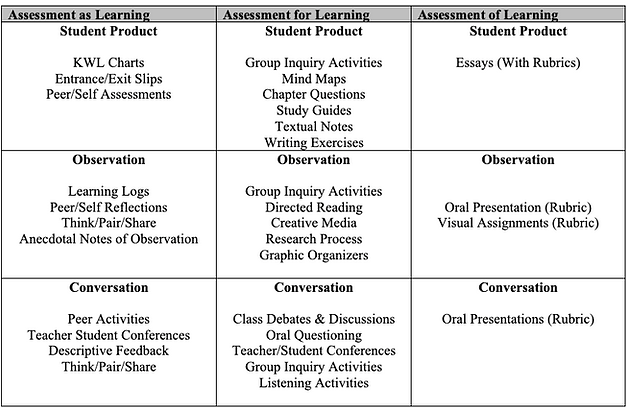
A final grade (percentage mark) is calculated at the end of the course and reflects the quality of the student’s achievement of the overall expectations of the course, in accordance with the provincial curriculum.
The final grade will be determined as follows:
Seventy percent (70%) of the grade will be based on evaluation conducted throughout the course. This portion of the grade should reflect the student’s most consistent level of achievement throughout the course, although special consideration should be given to more recent evidence of achievement.
Thirty percent (30%) of the grade will be based on a final evaluation administered at or towards the end of the course. This evaluation will be based on evidence from one or a combination of the following: an examination, a performance, an essay, and/or another method of evaluation suitable to the course content. The final evaluation allows the student an opportunity to demonstrate comprehensive achievement of the overall expectations for the course.